
Friday, January 29, 2016
Name animation

Tuesday, January 26, 2016
10 words
10 Words
For this10 word project we had to come up with 10 words that describe us and our personality's. Instead of using a frame timeline I used a video timeline and make the words fly into the background picture. I would have to say that the video timeline was more difficult because we had to mess with every word in the picture instead of just copying frames. I thought that the timing was the most difficult in this project because if one word was timed wrong it practically messed up the whole project, but I stayed calm and fixed the problem by asking Mr.Olsen and my peers next to me. Overall I liked this project because it wasn't very stressful. I would defiantly recommend this project to a friend
Thursday, January 14, 2016
Smile

Links:
If you would like to learn more about the principles of animation click the link below
Pink ball

Wednesday, December 16, 2015
Website pages

My home page from my website has to main areas: My elevator pitch and my personal bio.
In my bio paragraph I give a little bit about myself and talk about my interests and hobbies. Then in my elevator pitch I have a short little persuasion paragraph about how company's should hire me and how I would effect the business

Next in my project page I give a little sneak peak into my personal projects I make. My first project is my graphic design color wheel. I choose this project to post because I thought it was the most organized out of all my projects. Animation is my next area but I have not learned any animation skills but I am looking forward to learning. Last project on my page is my e9 commercial video. In this video I describe what e9 is all about and how the younger generations should invest in it.
Tuesday, December 8, 2015
How to tutorial
How to tutorial
In this quick tutorial it will teach you how to use the eclipse tool, arch line tool, magic eraser, and the rectangle tool. In this little tutorial I will teach you how to make a ornament.
First you need to open up illustrator and then start a new project. Then next you need to go to the eclipse tool and draw a circle.


After this you need to color the circle with the color sequence in the top left hand corner
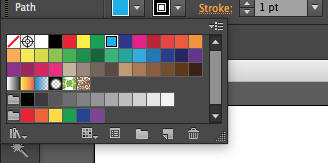
Once your circle is colored you need to go to the magic eraser tool and start clicking inside your circle to make dots. (you make as many as you would like)

Then next you can color the circle differently if you would like then next you need to draw a little square/rectangle to put on top of the circle.

Once you do so you will use the arch tool and create a thick line to make a little hook for the top of the ornament

After you apply the line you are done! You can customize it in any way you would like.

Thursday, December 3, 2015
Photoshop projects


Subscribe to:
Posts (Atom)